
ComforTrade Broker — Official Website Access & Key Details
ComforTrade is a browser-based trading service with a Client Area for account access, trading and account operations. The official broker website is comfortrade.com; ComforTrade.co is an independent affiliate website that helps users reach the service and understand its core features.
What is ComforTrade?
ComforTrade is an online broker service built around a web-based Client Area. The account environment brings together access to the trading terminal and the non-trading tools used to manage a profile, funding and withdrawals. This matters because the service is not split between a downloadable desktop program and a separate account portal: the core workflow is handled inside the browser.
The official Comfortrade materials describe both demo and real account use. A new account can start in demo mode with virtual funds, while real trading requires account funding and the applicable identity checks. The same browser environment is available on desktop and mobile, so the account is not tied to one device.
ComforTrade currently presents more than 60 trading instruments, including currency pairs and cryptocurrencies. The trading interface combines the selected asset, chart, trade duration, amount and direction in the same working area. Technical-analysis tools are also available inside the terminal rather than through a separate charting service.
The name also appears with slightly different spacing in some broker materials, including Comfort Trade. On this site we use the brand styling ComforTrade for the broker and ComforTrade.co for this independent website.
Inside the ComforTrade trading interface
This is a real English-language terminal screenshot from our own test. It shows the active CHF/JPY OTC instrument together with the chart, trade controls and the built-in indicator menu.
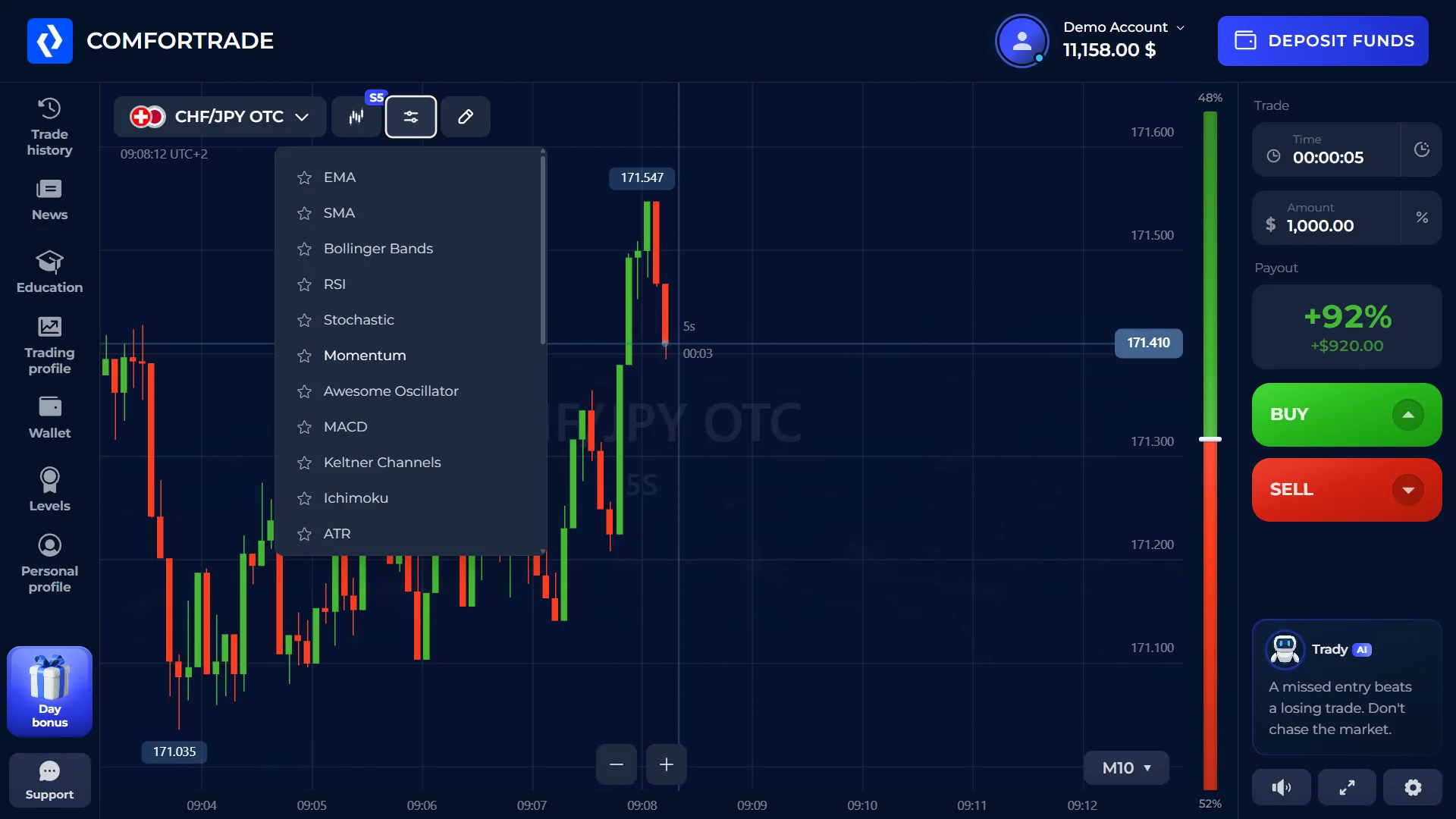
The indicator list visible in the terminal includes EMA, SMA, Bollinger Bands, RSI, Stochastic, Momentum, Awesome Oscillator, MACD, Keltner Channels, Ichimoku and ATR. The screenshot also shows the asset selector, chart, duration, trade amount and BUY/SELL controls. The platform section contains a closer look at the terminal, trade history, indicators and the mobile layout.
Explore the platform →Official ComforTrade website
The official broker service operates at comfortrade.com. That is where account creation, login and access to the Client Area take place. ComforTrade.co is separate from the broker and uses affiliate links when directing users to the service.
How ComforTrade works
The broker environment can be understood as four connected parts rather than a collection of separate tools.
Client Area
The browser workspace used for account details, trading and non-trading operations.
Demo & Real
Demo mode uses virtual funds; real mode is linked to the funded trading account.
Trading Interface
Asset, chart, duration, amount and trade direction are controlled from the terminal.
Account Operations
Profile settings, funding and withdrawal requests are handled through the account environment.
ComforTrade trading instruments
The broker currently states that more than 60 instruments are available. The main categories presented by the service are currency pairs and cryptocurrencies, with the available selection shown directly inside the terminal.
Choosing an instrument changes the chart and trading context without leaving the working screen. In our test, the terminal also exposed a built-in set of technical indicators, so chart analysis can be performed inside the same interface rather than in a separate application.
The available list can change inside the live platform, so the terminal is the best place to check which instruments are currently available to an account.
Key ComforTrade account conditions
These are the main account-level details currently stated in the broker's own materials and Client Agreement. For payment methods and verification steps, see the deposits and withdrawals section.
Choose what you need
Choose the section that matches what you want to do with your ComforTrade account.
ComforTrade on desktop and mobile
The core trading terminal runs in the browser, so the same account can be reached from a desktop browser or a mobile device. The official Getting Started material specifically describes the terminal as working on desktop and mobile.
The platform section covers the mobile layout, browser access and any software or app options that are actually available.
Frequently asked questions about ComforTrade
What is ComforTrade?
ComforTrade is a browser-based broker service with a Client Area that combines the trading terminal, account profile and non-trading account operations.
Is ComforTrade an online broker?
The official ComforTrade website presents the service as an online broker. Its Client Agreement describes Comfortrade Ltd as the company providing execution services for trading transactions involving CFD contracts.
What is the official ComforTrade website?
The official broker service is located at comfortrade.com. ComforTrade.co is an independent affiliate website and is not the broker's official website.
Does ComforTrade have a demo account?
Yes. The broker's Getting Started information states that the demo account becomes available after registration and uses virtual funds, so an initial deposit is not required for demo use.
Where can I find login, platform and payment information?
Use the dedicated login and registration, platform, and deposits and withdrawals sections.
Access ComforTrade
Go to the broker through our affiliate link or choose the account, platform or payments section above.